DIGITEK® (DTR 260 GT) Gorilla Tripod/Mini (13 Inch) Tripod for Mobile Phone with Phone Mount & Remote | Flexible Gorilla Stand for DSLR & Action Cameras Heavy Duty: The Gorillapod mobile tripod is made of high-quality ABS. Making it a very heavy-duty product and giving it an exponentially longer life, as compared to another plastic-based camera tripod. Ensuring that even with a very rough usage your mobile phone, camera, phone, DSLR, and tripod stand are safe. If Shooting in rough conditions and environments you have peace of mind that everything will be safe. Rotating Sphere: An Anodised finishing rotating sphere in tripods for mobile or gorilla tripod ensures that you get a great load-bearing capacity for your DSLR camera, mobile tripod, DSLR tripod, GoPro tripod. Along with an accurate angle lock. This ensures that your phone stands can take photos at angles that you desire and will stay in that angle as long as needed. This also ensures that no matter how heavy your d...
How To Remove Bloatware From Your Xiaomi Device without Root?

Overview :
Xiaomi is rapidly taking over the smartphone world with its budget devices. Dominating in the Indian and Chinese market, the company manages to deliver low-priced smartphones coupled with specs of a flagship device.
It goes without saying that Xiaomi, sometimes, drops the bar to deliver MI smartphones at ridiculous prices. We often see such compromises in the camera and design. Not to mention, absurd ads in the MIUI apps. However, all of that would have been accepted if Xiaomi didn’t annoy users with pre-installed MIUI apps, a.k.a. Bloatware.
It goes without saying that Xiaomi, sometimes, drops the bar to deliver MI smartphones at ridiculous prices. We often see such compromises in the camera and design. Not to mention, absurd ads in the MIUI apps. However, all of that would have been accepted if Xiaomi didn’t annoy users with pre-installed MIUI apps, a.k.a. Bloatware.
What is BloatWare in Mi Devices ?
The Bloatware term is used for smartphone apps that are locked by the vendor. Some known vendors are Samsung, Xiaomi, HTC, etc. In order to make the device’s user interface unique, they use this irksome technique of locking apps on the phone.
Unless you root the device, which is a tedious task in itself, you cannot uninstall or disable the bloatware. Here, I have compiled a few methods through which you can finally get rid of MIUI apps that feed off your RAM without going through the rooting process.
How to Uninstall/Disable MIUI Apps in Xiaomi Devices Without Rooting?
1. MIUI Hidden Settings
The Hidden Settings for MIUI app makes it easy for developers to perform formerly complex tasks in a few taps. For instance, you can access the Notification log, which was challenging to get into before.
The app has tabs for different Android versions including Android 7, Android 8, and Android 9. You can opt for any one of the Android versions, depending upon the MIUI version installed on your Xiaomi device. With the help of MIUI hidden features, you can get rid of some (not all) pre-installed apps (You can also uninstall the Google apps).
Remove Xiaomi Bloatware using MIUI Hidden Settings:
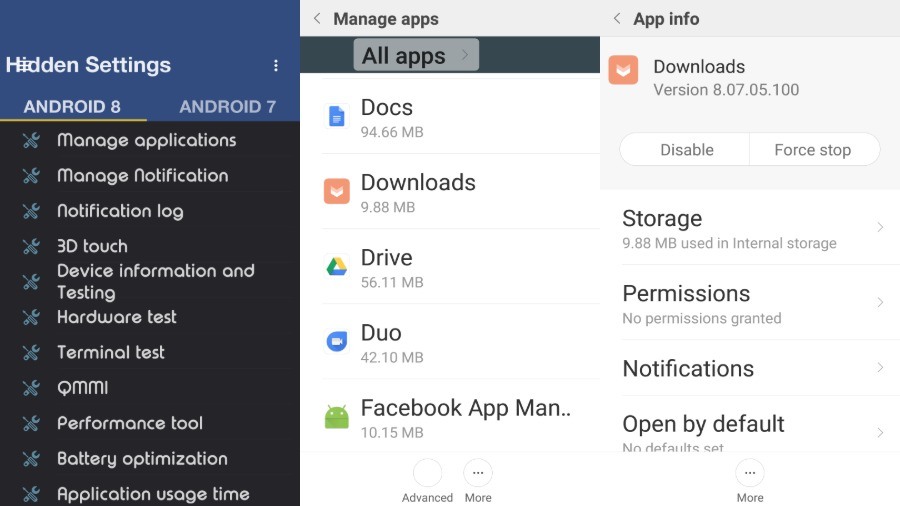
- Open the MIUI Hidden Settings app.
- Choose the Android version.
- Tap on the Manage Applications.
- Scroll over and tap on whichever app you want to remove from your device.
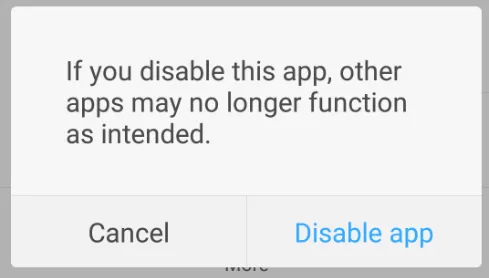
- Tap on the “Disable” or “Uninstall” option.
- Then tap on the “Disable app” button in the pop-up.
2. ADB and Fastboot
link of Required File :- https://cutt.ly/9klX6rr
Removing bloatware using ADB and Fastboot is a universal meathod and works with pretty much every Android powered devcie.
The catch is that it’s a bit technical. To pull it off, either you need to follow the steps accurately or know beforehand about ADB and Fastboot. So, I’d recommend you to try to follow the first option.
To uninstall the MIUI apps from your Xiaomi device, click on this link and follow the steps to “Remove bloatware from any Android device.”
If you encounter any bugs or system crashes, you can just reset the phone, and the Xiaomi device will go back to normal.
Disable MIUI Ads on your Xioami device
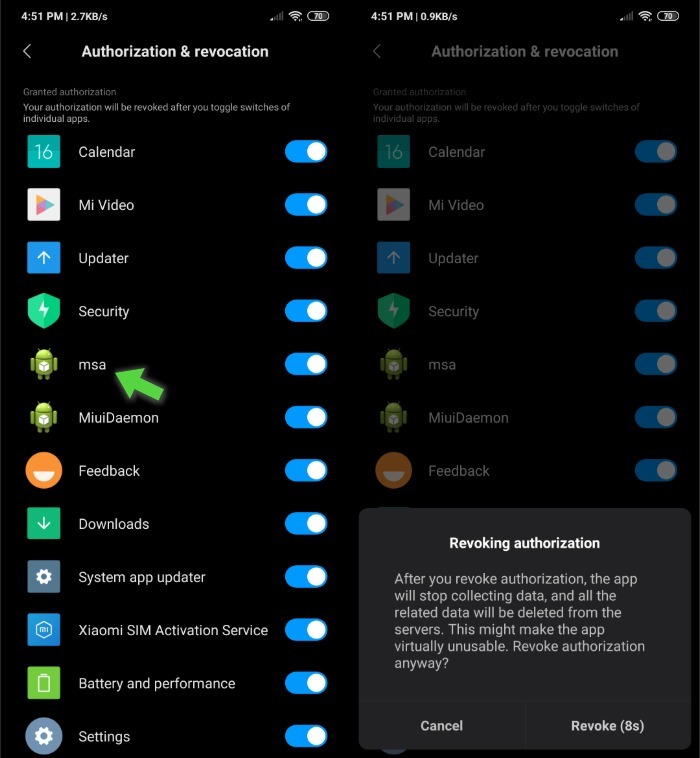
Not just the bloatware, can also get rid of some of the ads that show across the MIUI software. Go to Settings > Aditional Settings > Authorization & Revocation.
Here, you need to revoke the authorization for MIUI System Ads (msa) that collects data for advertising. So, tap the toggle button next to msa and tap on Revoke on the pop-up that shows up.
Is it safe to remove Xiaomi Bloatware?
Well, that depends! First, Xiaomi itself recommends not to follow such practices, so going by that, it’s not safe at all. But then again, they are the main culprit, so let’s skip their warning for now.
Other than that, Xiaomi bloatware removal can also be achieved by rooting the phone. Now, this is, in fact, a tricky method unless you know your stuff. Failed rooting procedure can brick your phone.
It’s also the case that many users consider anything non-Google as bloatware, irrespective of the fact that those apps are good or bad. Sometimes, these apps offer a better experience than Google apps.
Finally, let’s talk about the above-mentioned methods. Until now, I haven’t received any reports of issues occurring in the device, so if your device happens to come across a bug after performing these methods, do mention in the comments below.
Comments
Post a Comment